AnyChart JS Charting Library 7.12.0 Released
October 31st, 2016 by Margaret SkomorokhAnyChart JS charting library updated! We are glad to announce four new releases: AnyChart, AnyStock, AnyMap, and AnyGantt 7.12.0 are now available for download.
AnyChart 7.12.0 New Features
 |
Localization Support One of the main news of this release: support of localization using locale settings files and special formatting functions. Now our JS charting library allows to switch between 196 different regional settings, and all date/time chart elements update themselves. Take a look at AnyChart Localization demo>> Learn more about Localization Support>> |
 |
Standalone Chart Elements Now you can use all chart building blocks, such as scales, axes, legends and so on to build your own charts and dashboards. Use this feature along with AnyChart’s GraphicsJS graphics library, and you will be able to create your own unique charts and visualizations. Learn more about Standalone Chart Elements>> |
 |
Tooltip Settings Improvement API for tuning chart and series tooltips is improved. These changes allow to make your applications simpler, leaving room for flexibility as well. Learn more about Tooltip Settings Improvement>> |
AnyStock 7.12.0 New Features
 |
Localization Support One of the main news of this release: support of localization using locale settings files and special formatting functions. Now our JS charting library allows to switch between 196 different regional settings, and all date/time chart elements update themselves. Take a look at AnyStock Localization demo>> Learn more about Localization Support>> |
 |
Range Selection UI Controlling data grouping and time interval is paramount when it comes to financial data and stock charts. We are happy to present a set of UI elements that help you to add range selection functionality to your applications. Take a look at Range Selection UI in the Gallery>> Learn more about Range Selection UI>> |
AnyMap 7.12.0 New Features
 |
Localization Support One of the main news of this release: support of localization using locale settings files and special formatting functions. Now our JS charting library allows to switch between 196 different regional settings, and all date/time chart elements update themselves. Take a look at AnyMap Localization demo>> Learn more about Localization Support>> |
 |
Map Grid (Meridians and Parallels) Showing meridians and parallels on a map greatly improves its design and provides a clear view in visualizations where latitude and longitude do matter. Map Grid (Meridians and Parallels) in the Gallery>> Learn more about Map Grid>> |
 |
Map Axes Map axes with latitude and longitude labels complement map grid showing meridians and parallels on a map. Geo Scale that controls Map Axes and grid allows to fine-tune the display and achieve a great variety of looks and feels for map visualizations. Learn more about Map Axes>> |
 |
Map Crosshair Map Crosshair is a visual position tracking element, especially useful in exploratory data analysis visualizations. It works nicely in conjunction with Map Grid and Map Axes. Take a look at Map Crosshair in the Gallery>> Learn more about Map Crosshair>> |
AnyGantt 7.12.0 New Features
 |
Brand New Resource Chart (Beta) We are doing our best to improve our products and this time we decided to take a fresh look at Gantt and Resource charts. We have studied how people manage projects and company resources, what they want to see, how they want to display things happening, and goals they want to achieve. As the result, we understood that we have to redesign Resource and Gantt Charts completely. In this release we present the beta version of new Resource Chart. Take a look at Resource Chart and Resource Chart with Time Tracking in the Gallery. Learn more about Resource Chart and Resource Chart with Time Tracking. |
 |
Calendar Support One of the main features of the new Resource Chart is the ability to set the calendar for all resources or some of them. You can configure weekends, holidays, time of availability, beginning of a calendar year, and so on. Learn more about the Calendar>> |
 |
Smart Timeline New Resource Chart features the improved timeline that looks nice with any data. This new Smart Timeline will be made interactive and available in Gantt Charts in the next update. Learn more about the Smart Timeline >> |
AnyChart version history: https://www.anychart.com/products/anychart/history/
AnyStock version history: https://www.anychart.com/products/anystock/history/
AnyMap version history: https://www.anychart.com/products/anymap/history/
AnyGantt version history: https://www.anychart.com/products/anygantt/history/
Trial download: https://www.anychart.com/download/
- Categories: AnyChart Charting Component, AnyGantt, AnyMap, AnyStock, HTML5, JavaScript, News, Stock Charts
- 1 Comment »
AnyChart Open-Sources Powerful, Draw-Anything JS Graphics Library GraphicsJS
September 15th, 2016 by AnyChart TeamIt is a pleasure for us to announce this today! We have just launched GraphicsJS, a free, open-source, lightweight JavaScript library which allows you to draw any JS graphics and animation for your HTML5 projects very easily. It is significantly more powerful and feature-rich than Raphaël, BonsaiJS, and other formerly leading SVG/VML graphics solutions.
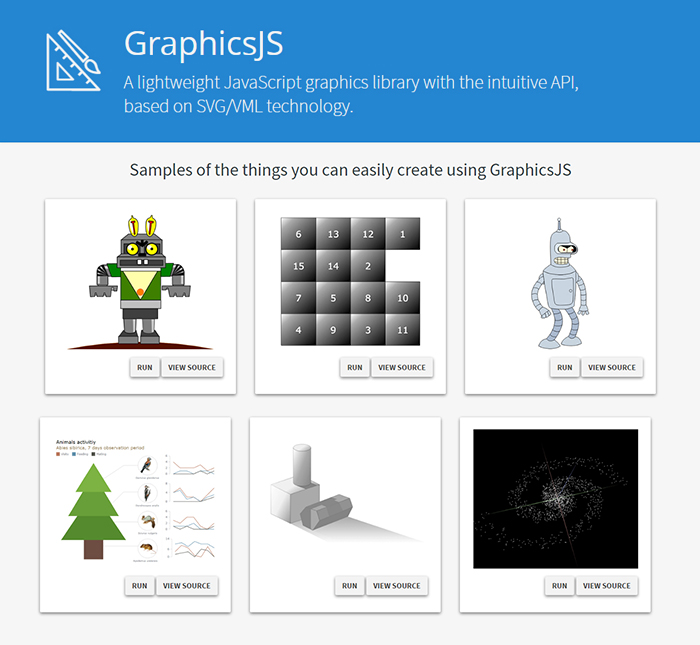
GraphicsJS has always been the graphics engine that our JavaScript (HTML5) charting libraries are built on – AnyChart, AnyStock, AnyGantt, and AnyMap. As a result, it already powers data visualization activities for many of you – Oracle, Microsoft, Volkswagen, AT&T, Samsung, BP, Bosch, Merck, Reuters, Bank of China, Lockheed Martin, and thousands of all the other highly respected AnyChart’s customers including more than 70% of Fortune 1000 companies.
Of course, data visualization is not the only but just one of multiple fields where the library of GraphicsJS can be helpful and even essential. Generally speaking, this solution can help you produce virtually anything graphical from scratch: static and animated images, cartoons, games, interactive infographics, mind maps, and many other amazing things in HTML5.
Key Features of JS Graphics Library
- Mighty line drawing abilities – Bézier curves, arcs, rectangles, and many other kinds of forms and deformations.
- Powerful text manipulation features – multiline texts, measurement, including width, height, as well as wrap, overflow, indent, spacing, align, etc.
- Virtual DOM for drawing fast and only what is necessary.
- Smart layering system with z-index.
- Transformation engine – embarrassing in-browser transformations are not used.
- Legacy browser support (Internet Explorer 6+).
- Concise and convenient JavaScript API with chaining support.
By the way, making our graphics engine open-source is just the beginning as – we are also pleased to tell you – AnyChart is going to open the source code of our charting libraries soon! We believe that our great developments in the fields of graphics and data visualization should be even more visible and reachable to any programmer from any part of the world, not to mention that we would love to allow the community to contribute.
Please refer to GraphicsJS.org to learn more about GraphicsJS. As always, the demos are available on our Playground (Graphics section). Also, let’s not forget about the Graphics Documentation and Graphics API Reference.
What’s more, the GraphicsJS library and all relevant samples can be freely downloaded and forked on GitHub.
- Categories: AnyChart Charting Component, AnyGantt, AnyMap, AnyStock, Charts and Art, Dashboards, Financial Charts, Gantt Chart, GraphicsJS, GraphJam, HTML5, JavaScript, News, Stock Charts, Third-Party Developers, Tips and Tricks, Uncategorized
- 5 Comments »
AnyChart Charting Library 7.11.1 Available
September 2nd, 2016 by Margaret SkomorokhA hotfix for AnyChart charting library is now available: we have released AnyChart, AnyMap, AnyGantt, and AnyStock 7.11.1. Here is a full list of improvements and bug fixes:
All Products
Improvements
- Legend width/height behavior improved.
- Scatter Series behaviour made consistent with other series.
- Credits behaviour improved.
- The appendTheme() method added for easier management of themes.
- Beta version of the Data Adapter Module added for easier management of external files.
- Export Server can now return images as base64 strings or as shareable links.
Bug Fixes
- XML Schema validity problems fixed.
- Various minor Export Server issues fixed.
- Various minor Interactivity issues fixed.
- Inconsistent zIndex behaviour fixed.
- Various XML serialization/deserialization fixed.
- Various JSON serialization/deserialization fixed.
- The toXML() deserialization method no longer adds unnecessary data into XML.
AnyChart
Improvements
- Circular Gauge Ranges and Axis Bar can now be properly rounded.
Bug Fixes
- Pie events fixed.
- Funnel Chart label placement algorithm fixed.
- Series on/off problems fixed.
- 3D Chart events fixed.
- Context Menu in Linear Gauges fixed.
- Series Legend Interactivity issues fixed.
- Seat Map labels fixed.
- Legend Interactivity issues fixed.
- Issues with Ordinal Axis Labels fixed.
- Circular Gauge Gradient display issues fixed.
- Tree Map coloring issues fixed.
- Range Marker issues fixed.
AnyMap
Bug Fixes
- The remove() method problems fixed.
AnyGantt
Bug Fixes
- Problems with inheritance of PERT Chart settings fixed.
- PERT Chart export CSV issues fixed.
AnyStock
Improvements
- Overall Performance improved, especially in Firefox.
AnyChart version history: https://www.anychart.com/products/anychart/history/
AnyMap version history: https://www.anychart.com/products/anymap/history/
AnyGantt version history: https://www.anychart.com/products/anygantt/history/
AnyStock version history: https://www.anychart.com/products/anystock/history/
Trial download of AnyChart charting library: https://www.anychart.com/download/
- Categories: AnyChart Charting Component, AnyGantt, AnyMap, Financial Charts, Gantt Chart, HTML5, JavaScript, News, Stock Charts
- No Comments »
HTML5 PERT Chart by AnyGantt and More
August 5th, 2016 by Margaret Skomorokh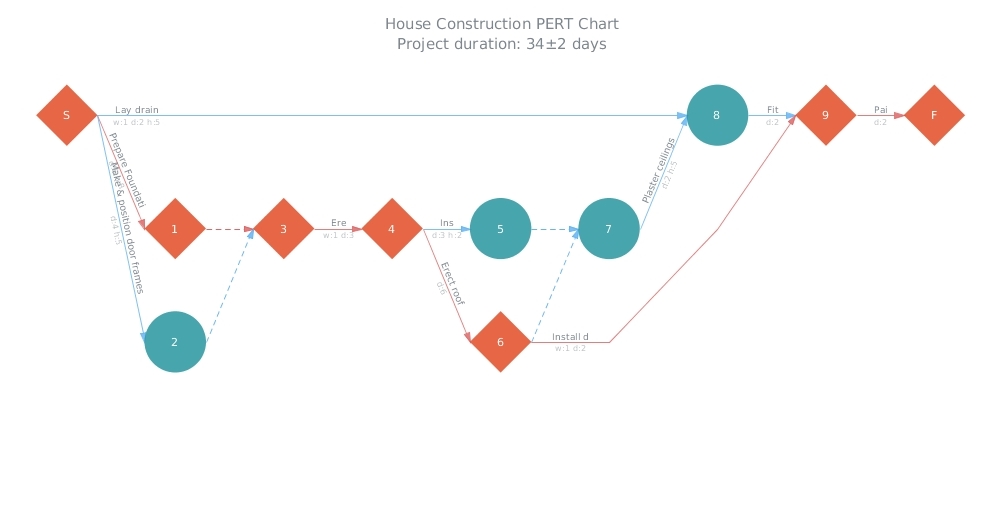
Here is a quick recap of the visualizations that we have shared with you this week on AnyChart Facebook Page and in Twitter (including an HTML5 PERT Chart by AnyGantt):
- Where Europe is most and least innovative, in 6 maps (a data visualization by The Washington Post) – The continent’s most creative and productive regions are in Germany, France, Britain and the Nordic countries. Southern England, northern Denmark, southern Germany and Paris are particularly successful — whereas Romania, Poland and Spain have disproportionately more regions that lack innovation.
- Pokémon dual-type charts – looks like playing Pokémon Go is not that easy!
- Global Sharknado Threat Map – Created by an unprecedentedly cross-discipline team of nameless chain-smoking scientists in white lab coats, this map is intended as a resource to coastal communities regarding the nature and likelihood of a sharknado incursion. Right?X
- House Construction (HTML5 PERT Chart by AnyGantt). In AnyGantt 7.11.0, we have added a new decision-making tool – PERT Charts. PERT is an abbreviation for “Program (Project) Evaluation and Review Technique”. This technique, developed by the U.S. Navy in the 1950s, is used in project management to analyze and represent the tasks involved in completing a given project. It is applied mostly in large-scale projects where time is the major factor and allows to schedule a project without knowing precisely the details and durations of all activities. For example, PERT was used in planning the 1968 Winter Olympics in Grenoble. You can see more samples of AnyGantt PERT charts in our PERT Chart Gallery.
- Categories: AnyChart Charting Component, AnyGantt, HTML5, JavaScript, News
- No Comments »
AnyChart 7.11.0 with JS Stock Drawing Instruments Released
July 27th, 2016 by Timothy LoginovGood news! We have released AnyChart, AnyStock, AnyMap, and AnyGantt 7.11.0. In the new versions of our products, you will find such long-awaited features as JS Stock Drawing Instruments, Pert Charts, Linear Gauges, Seat Maps, and more. Here is the full list of improvements:
AnyStock

Stock Overlay Drawing Instruments are a complete set of drawing tools that allow end users to add drawings to charts. It includes such tools as Line segment, Ray, Trend Line, Vertical Line, Horizontal Line, Rectangle, Ellipse, Triangle, Trend channel, Andrew’s pitchfork, Fibonacci fan, Fibonacci arc, Fibonacci retracement, Fibonacci Time Zones, Buy/Sell Signals, and more – all of them being fully configurable and easily manageable.
Take a look at Stock Overlay Drawing Instruments Demo >>
Take a look at Stock Overlay Drawing Instruments in the Gallery >>
Learn more about Stock Overlay Drawing Instruments >>

AnyStock now supports the Y-Scale “Comparison Mode”, which allows comparing changes in series values. Changes can be shown in two modes: value and percent, and a custom date can be set as the comparison base.
Take a look at Y-Scale Mode in the Gallery >>
Learn more about Y-Scale Mode >>
AnyChart

All AnyChart charts now support AAA-level web accessibility standards (Section 508) using very flexible a11y (accessibility) features. AnyChart supports two accessibility modes:
Learn more about Accessibility Support >>

We have created a very flexible way of building any type of Linear Gauges. You can use built-in constructors for LED, Tank, and Thermometer Gauges or build your own Gauge with simple configurations.
Take a look at Linear Gauges in the Gallery >>
Learn more about Linear Gauges >>

The Chart Editor feature, which makes the integration of AnyChart much easier, is a dialog window that allows to create and set up various chart types. The result can be saved with fixed data in XML or JSON format or in a reusable format with a JavaScript code string.
Take a look at Chart Editor Demo >>
Learn more about Chart Editor >>

The Async Rendering feature allows you to make web pages and applications with a big number of charts more responsive during the page loading process.
Learn more about the Async Rendering feature >>
AnyMap

Seat Maps simplify the process of building interactive Airplane Seating Charts, Opera and Cinema Plans, or any other types of seat maps. It is suitable for building interactive schemes of parks, malls, or virtually any other entities.
Take a look at Seat Maps in the Gallery >>
Learn more about Seat Maps >>

We have added a lot of features to improve visual appearance of geographical maps. Now it is possible to place region labels outside of regions bounds, using Latitude/Longitude data. The Label Overlap Control feature helps to keep a big amount of labels under control. Small regions can be highlighted using the Callout feature.
Learn more about Map Label Positioning Improvements >>

AnyMap now supports loading geodata in TopoJSON format. Geographical data files in TopoJSON format are much smaller, using them allows to reduce map rendering and page loading time.
Take a look at a sample of using TopoJSON format as geodata >>
Read more about TopoJSON Format Support >>

AnyMap now supports loading Geo Data in SVG format. This format may be quite useful if you want to edit a map in a simple vector editor or to create a map of an imaginary place, a road map, or a map with rivers or custom labels.
Take a look at a sample of using SVG format as geodata >>
Read more about the Ability to Use SVG Images as Geo Data >>
AnyGantt

A PERT Chart (Program evaluation and review technique) is a great decision-making tool designed to save time in achieving end-objectives. AnyGantt provides flexible settings of milestones (events), tasks (activities) and critical path.
Take a look at PERT Charts in the Gallery >>
Learn more about PERT Charts >>
AnyChart version history: https://www.anychart.com/products/anychart/history/
AnyStock version history: https://www.anychart.com/products/anystock/history/
AnyMap version history: https://www.anychart.com/products/anymap/history/
AnyGantt version history: https://www.anychart.com/products/anygantt/history/
Trial download of our JS framework: https://www.anychart.com/download/
- Categories: AnyChart Charting Component, AnyGantt, AnyMap, AnyStock, HTML5, JavaScript, News, Stock Charts
- 1 Comment »
Documentation for AnyChart Web Charts: Now Offline
June 17th, 2016 by Margaret Skomorokh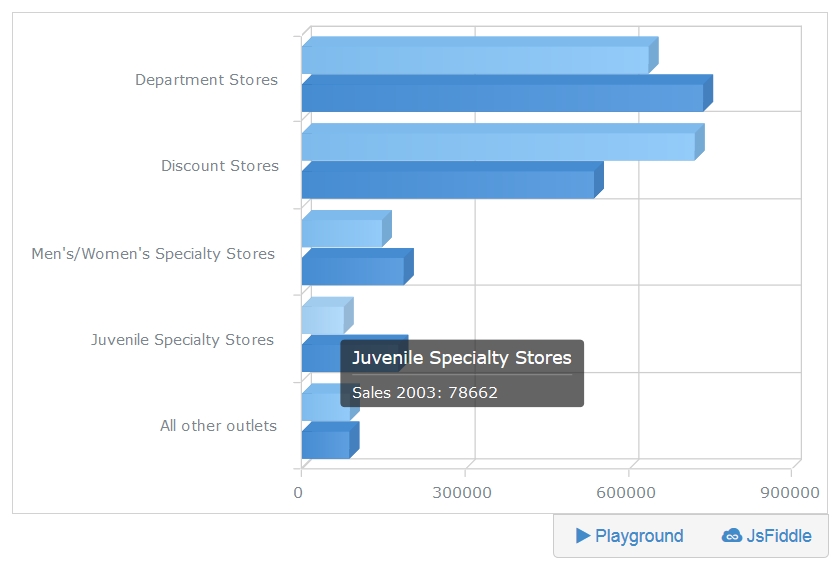
Good news: now you can download documentation for AnyChart web charts and work with it offline, which is a useful option for anyone with a slow Internet connection. To do it, you should go to https://docs.anychart.com, choose AnyChart version in the upper menu, and press the “Download.zip” button to the right of it. You will get the documentation describing the version of your choice.
AnyChart has a great documentation: for the current version (7.10.1), there are more than 140 articles and almost 900 samples, explaining every aspect of our product and demonstrating how to work with it. You can run all the samples both in JSFiddle and in our PlayGround. Also, you can find an even more detailed description of our charting library in AnyChart API. For more samples, see AnyChart Gallery.
- Categories: AnyChart Charting Component, AnyGantt, AnyMap, HTML5, JavaScript, Stock Charts
- No Comments »
AnyChart JS Charting Library 7.10.1 Released
June 4th, 2016 by Margaret SkomorokhAnyChart JS charting library has been updated: we have released a hotfix for all our products.
AnyChart, AnyStock, AnyMap, and AnyGantt 7.10.1 contain the following changes:
- Solved compatibility issues between AnyChart UI and other AnyChart products.
- Solved compatibility issues with old versions of ExtJS (3.4 and less).
Also, there are a few other bug fixes:
AnyChart 7.10.1
- Fixed a bug with the scroller and continuous series.
- Fixed a bug with tooltips in the TreeMap Chart.
AnyStock 7.10.1
- Fixed a bug with a single point in Stock Charts.
- Solved issues with EMA/SMA technical indicators.
- Solved issues with the mapAs method being called on an empty data table.
AnyChart version history: https://www.anychart.com/products/anychart/history/
AnyStock version history: https://www.anychart.com/products/anystock/history/
AnyMap version history: https://www.anychart.com/products/anymap/history/
AnyGantt version history: https://www.anychart.com/products/anygantt/history/
Trial download of our products: https://www.anychart.com/download/
- Categories: AnyChart Charting Component, AnyGantt, AnyMap, AnyStock, HTML5, JavaScript, News
- No Comments »
HTML5 Gantt Chart by AnyGantt and More
March 13th, 2016 by Margaret Skomorokh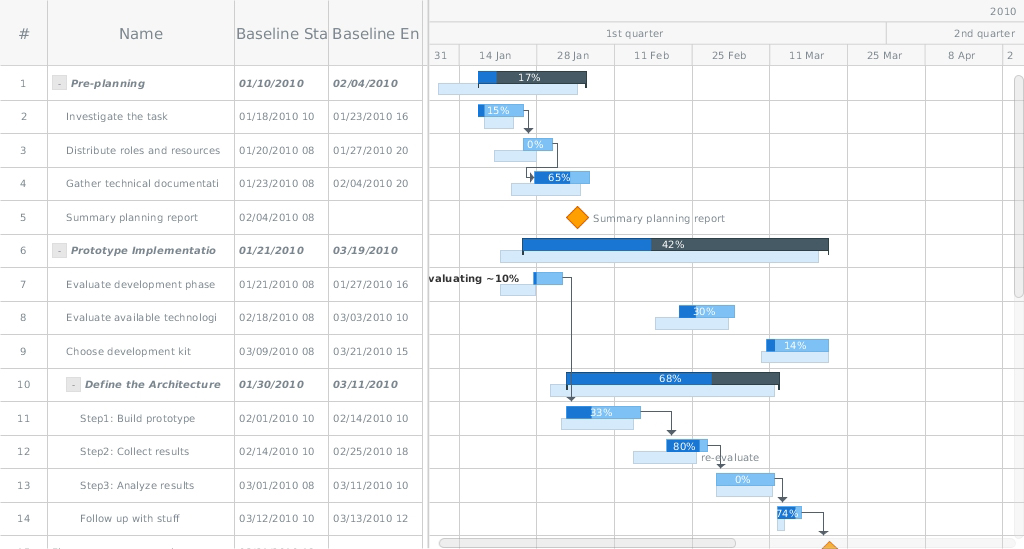
This week we have shared with you on AnyChart Facebook Page and in Twitter some really neat data visualizations – including an HTML5 Gantt chart by AnyGantt. Here is a quick recap of our posts:
- How Do People Play The Trading Game? (Or: How 13,000 People Turned 108 Real Hours of Their Lives Into 6.7 Trillion Imaginary Dollars) – a nice trading game and an article about it on Bloomberg Business.
- How You Will Die – this colorful simulation by FlowingData tells you how and when you will die, given your sex, race, and age. Good news: mortality rate is much lower in the earlier years of life than in the older years. Another interesting fact is that if you get past a certain age, the probability to die of cancer decreases. Earlier we posted a simulation by the same author, predicting how long you will leave. Here it is (in case you did not see it): Years You Have Left to Live, Probably
- Is there a connection between performance and popularity in tennis? Untangling Tennis is visual and data analytic exploration of success in tennis, uncovering the relationship between the two things. In this article you can see a few of the many phenomena that can be discovered about the life and career of a professional tennis player using this data visualization project. You can play with it and discover your own findings here: Untangling Tennis: Tool.
- Planned-vs-Actual: HTML5 Gantt Chart by AnyGantt – This HTML5 Gantt chart created with AnyGantt demonstrates how Gantts can be used for comparing plans and reality. A Gantt chart is actually a type of bar chart representing a project schedule (and, sometimes, other things), invented independently in 1896 and in the the 1910s by two different people. It was the second one, Henry Gantt, after whom Gantts were named. As you see, it is a complex data visualization containing a lot of information, and yet it is quite readable and visually appealing. AnyGantt, due to its’ flexibility and rich interactivity it offers, is a perfect tool for creating such a visualization.
- Categories: AnyChart Charting Component, AnyGantt, HTML5, JavaScript, News
- No Comments »
AnyChart JavaScript Charts 7.9.0 Released
January 27th, 2016 by Margaret SkomorokhWe are very glad to announce that we have updated all products in our AnyChart JavaScript Charts Package! Four new releases are now available for download: AnyChart 7.9.0, AnyMap 7.9.0, AnyGantt 7.9.0, and AnyStock 7.9.0.
We have added 3D charts and String Tokens to AnyChart and have significantly improved its performance. AnyMap now supports Longitude and Latitude as well as Move and Zoom; unique projections for more than 220 maps have been added. Other important new features are Event Markers, Timeline Markers, Localization Support (AnyGantt) and Technical Indicators (AnyStock).
AnyChart 7.9.0 New Features
 |
3D Bar/Column Chart Though data visualization specialists take a negative attitude towards any Pseudo 3D graphics, we think that our 3D Bar and Column JavaScript Charts are able to complement and enhance any visualization. You can adjust the angle and depth using the zAngle and zDepth methods. Take a look at 3D Bar/3D Column Chart in the Gallery. Learn more about 3D Bar/3D Column Chart. |
 |
3D Area Chart We are very proud that we have succeeded to create such a beautiful 3D Area JavaScript chart. Just as in the case of 3D Bar/Column Charts, you can adjust the angle and depth using the zAngle and zDepth methods. Take a look at 3D Area Chart in the Gallery >> Learn more about 3D Area Chart >> |
 |
String Tokens The String Tokens feature is an alternative to formatting text in labels and tooltips using formatting functions. Unlike functions, String Tokens are much more convenient in simple cases. They provide more flexibility in terms of settings serialization and are more familiar to the customers that have been using our Flash-based components. Learn more about String Tokens >> |
 |
Migration Tool Migration Tool is a small JavaScript library with an open source code, which is aimed to facilitate the transition from AnyChart 6 to AnyChart 7. Its main function is converting AnyChart 6 XML/JSON settings to AnyChart 7 settings. This library also contains special functions for partial conversion and creating custom converters. Learn more about Migration Tool >> Check out the Github repo >> |
 |
Performance Improvement In this release we have significantly improved performance: the number of points that can be displayed in less than a second has increased from 3000 to 10000. However, it is not the limit of AnyChart capabilities. Every release contains performance improvements, and we are not going to stop! Take a look at the Benchmark Page >> |
AnyMap 7.9.0 New Features
 |
Longitude/Latitude support We have added an option to set coordinates (specify a location) of Bubbles in Bubble JavaScript Charts in longitude and latitude degrees. New methods have been added to the API: the allow to convert mouse coordinates to longitude and latitude (transform) and vice versa (inverseTransform). Take a look at the Bubble Gallery sample >> Take a look at the Lat/Long API Gallery sample >> Learn more about Longitude/Latitude support >> |
 |
Move/Zoom API Now there is a possibility to change the scale and move a map. An API for creating a custom UI (buttons, scrolls, etc.) has been added. Take a look at the Gallery sample >> Learn more about Move/Zoom API >> |
 |
Rich Integration of Keyboard and Mouse Controls Mouse integration: Mouse Wheel – Zoom a map; Mouse Drag – Move a map (works only when the map is zoomed); Keyboard integration: Cmd/Ctrl + – Zoom in; Cmd/Ctrl – – Zoom out; Cmd/Ctrl 0 – Actual size; Arrow up – Move up; Arrow down – Move down; Arrow left – Move left; Arrow right – Move right. Take a look at the Gallery sample >> Learn more about the Integration of Keyboard and Mouse Controls >> |
| Map Collection Improvement We have added unique projections for more than 220 maps, which has significantly improved their appearance. |
AnyGantt 7.9.0 New Features
 |
Localization Support Our new Localization Engine localizes dates and numbers according to the settings of choice. All the functions available work both with the input data and displayed data. Our Localization Engine can be used in custom formatting functions of AnyChart as well as apart from AnyChart to localize your own UI elements. To simplify the integration process, we have prepared more than 180 localization files for various regions of the world. Take a look at the Gallery sample >> Learn more about Localization Support >> |
 |
Event Markers Even Markers is an excellent feature for displaying time intervals and important events on Gantt JavaScript Charts. Take a look at the Gallery sample >> Learn more about Event Markers >> |
 |
Timeline Markers (Multiple Milestones) Timeline Markers are aimed for displaying various events in processes – such as receiving a payment, specifying a task, meeting a customer, etc. Take a look at the Gallery sample >> Learn more about Timeline Markers >> |
AnyStock 7.9.0 New Features
 |
Technical Indicators In this release we are happy to introduce one of the most anticipated features – AnyStock JavaScript Charts Technical Indicators. The advantage of our Technical Indicators is the possibility to create custom indicators. Full customization of both visual and mathematical components is available. This release includes 5 predefined indicators: MACD, RSI, SMA, EMA, ROC. Take a look at Technical Indicators in the Gallery >> Learn more about Technical Indicators >> |
AnyChart version history: https://www.anychart.com/products/anychart/history/
AnyMap version history: https://www.anychart.com/products/anymap/history/
AnyGantt version history: https://www.anychart.com/products/anygantt/history/
AnyStock version history: https://www.anychart.com/products/anystock/history/
Trial download: https://www.anychart.com/download/
- Categories: AnyChart Charting Component, AnyGantt, AnyMap, AnyStock, Gantt Chart, HTML5, JavaScript, News
- No Comments »
Recap of the Week – 11/8/2015
November 9th, 2015 by Margaret SkomorokhHere is a quick recap of AnyChart news and interesting information on data vsualization, which we have shared with you this week on AnyChart Facebook Page and Twitter:
- AnyChart 7.8.0 – Good News! We have updated all our products, and now #AnyChart, #AnyGantt, #AnyStock, and #AnyMap 7.8.0 are available for download. We have added a number of important features, including JavaScript Heat Map charts and Zoom & Scroll in AnyChart as well as Editing Mode and UI in AnyGantt.
- Bond v Bond: the return of 007 – The history of Bond… James Bond!
- Data Cycles is a simulated real-time visualization using a year’s worth of Bay Area Bike Share data – just click Play and enjoy all these bikes riding from station to station. You can also see a few nice interactive charts in the Statistics section.
- A Nation of Poverty – Concentrated poverty in the neighborhoods of the largest urban cores in the United States has exploded since the 1970s. Check out the charts illustrating this process.
- Categories: AnyChart Charting Component, AnyGantt, AnyMap, AnyStock, HTML5, JavaScript, News
- No Comments »